Developer’s guide
Introduction and disclaimer
This guide intends to work as an introduction into kmcos’ internal structure, including both the automatically generated Fortran code, as well as the code generation procedure. As the name suggest, the intended audience are those who want to contribute to kmcos as developers. This guide will assume that you are familiar with the way in which kmcos is used. If that is not the case, you should start reading the sections of the documentation intended for users and/or go through the Intro to kmcos tutorial.
DISCLAIMER: This is information is provided with the hopes that it will ease your way into kmcos’ codebase, but it may contain errors. In the end only the interpretation of the code itself can really let you effectively add functionality to kmcos.
For developers of the project, branch management will follow this flowchart
How to edit, install, and test your changes locally
With every change made to the kmcos source code (within the kmcos directory), kmcos needs to be reinstalled for the changes to take place. Before re-installing kmcos, to ensure the re-installation occurs correctly, it’s best to delete any past kmcos installation files in your python environment. To do so, locate the site-package directory for whichever python environment you’re using (typically this would be located in a directory that looks something like ~/VENV/kmcos/lib/python3/site-packages/). Within the site-packages directory, delete any subdirectories that have the name kmcos as well as any other files you see with the name kmcos (typically egg or zip files). Next, using the terminal, navigate the kmcos source code directory that you have edited, and make sure you are in the directory where setup.py is located. Run the following commands to reinstall kmcos with changes
source ~/VENV/kmcos/bin/activate #this is the command to enter the python virtual environment
python3 setup.py build
python3 setup.py install
Now that the kmcos dependencies are updated, you can start testing your latest changes.
Before pushing to github, you should enter the the tests directory and run the unit tests.
Some nomenclature
For some terms used frequently in this guide, there might exist some ambiguity on exact meaning. Here we present some definitions to try to alleviate this. Probably some ambiguity will remain, but hopefully not anything that cannot be discerned from context.
site: In kmcos, this can have two different interpretations: either a specific node of the lattice or a type of site, e.g. a crystallographic site (top, fcc, hollow…). In this guide we use the former meaning: an specific position on the simulation lattice. When we need to indicate the second meaning, we will use site type.
coordinate: indicates the relative position of a site in the lattice with respect to some other site. In general, a coordinate will be given as a pair of site pair and an offset representing the relative positions of the unit cells (in units of the unit cell vector). The site used as reference will depend on the context.
process: a set of elementary changes that can occur on the lattice state on a single kMC step. A process is defined by a list of conditions and actions, and a rate constant expression.
executing coordinate: A coordinate associated to each process to be
used as a reference for the relative positions of conditions and actions
when defining the Fortran routines. In local_smart and lat_int
the executing coordinate is found with the help of the
kmcos.types.Process.executing_coord method. In otf the concept of
executing coordinate is not used, the reference position in the lattice
is the central position implied by the user during model definition,
i.e. the position in which coordinates have offset = (0, 0, 0).
event: a process for which an specific site has been selected.
active event: An event that can be executed given the current state of the lattice, i.e. an event for which all associated conditions are fulfilled.
lateral interactions: For kmcos models built for the local_smart
or lat_int, we will say that such model includes lateral
interactions if there is one or more groups of processes with the
following characteristics:
- their actions are all identical
- the conditions occurring on the same sites as the actions are identical
- there is a group of additional sites in which these processes have conditions, but these conditions are different for each process in the group
These processes represent the same change in the lattice, but under a difference state of the rest of the sites. These groups of processes are typically used to account for the effect of surrounding species on the values of the rate constants, i.e. the lateral interactions.
lateral interaction group: The group of processes defined by items a, b, c above.
bystander (local_smart or lat_int backends) The set of
conditions of item c above, i.e. conditions of a process in a lateral
interaction groups that do not have an action associated to it.
bystander site/coordinate: A site/coordinate associated with a bystanders.
participating sites: Sites associated with actions from item a and conditions from item b of the definition of a lateral interaction group.
lateral interaction event group: a collection of events occurring on the same lattice site and whose associated processes belong to the same lateral interaction group. Due to the nature of lateral interaction groups, only one of such events can be possible in a lattice at any given time.
bystander (otf backend): In the otf backend, the concept of
bystander is explicitly included in the model definition, i.e. it is a
new class kmcos.types.Bystander exclusive to this backend. An otf
model is said to include lateral interactions if one of its processes
includes such bystanders. Note that models without lateral
interactions should not be built using the otf backend, as
local_smart will definitely be more efficient.
The three backends
While most kmcos users will only need to worry about the Python interface to build and run the model, developers will also need to familiarize with the FORTRAN core code. The exact structure of this code depends on the backend that one selects. Which backend is most appropriate depends on the nature of the kMC model being implemented. Below we present a qualitative description of each backend.
local_smart
This is the original kmcos backend and has been used as a basis and
inspiration for the rest of the backends. It was built with the implicit
objective of offering the best run time performance at the expense of
memory usage. For this reason, a key element in this backend is a
precalculated list of rate constants, stored in the base/rates
array.
This is the most efficient backend when the number of different rate constants list is reasonable small.
For models with very large number of different processes nproc (such
as cases in which large lateral interaction groups exist) some
undesirable effects can occur:
- The time needed to run a kMC step can become large, as it scales as
 .
. - The bookkeeping data structures, which scale in size with the total number of processes, can become too big for available memory.
- The size of individual source code files can become very large, making compilation very slow or even impossible due to memory requirements.
lat_int
The lat_int backend is the first attempt to alleviate the problems
of local_smart for models with lateral interaction groups of
moderate size. The main differences between them is that lat_int
structures the generated code around the different lateral interaction
groups and splits the source files accordingly. This way compilation is
faster and requires less memory. A necessary consequence of this is that
the logic for the lattice update needs to be different.
TODO: I seem to recall that there are models for which lat_int
outperforms local_smart, even when local_smart can eventually
compile and run. This should be verified and interpreted (i.e. is
lat_int smarter than local_smart some times? If so, why?).
otf
For processes with lots of lateral interactions, i.e. very large lateral
interaction groups, keeping a list of precalculated rate constants (and
the proportionally large bookkeeping arrays) is unfeasible. The
alternative is to evaluate rate constants during runtime, i.e. on the
fly. kMC models built using the otf array do just that. To
accommodate for this, the concept of a process in otf is different
to that in the other backends. In otf, all members of a lateral
interaction group are represented by a single process. Therefore, the
total number of processes and, consequently, the size of bookkeeping
arrays is much smaller. The counterpart from this improvement is that
now a kMC step scales linearly with the system size (instead of being
constant time).
The structure of the FORTRAN code.
Here we present a description of the different files in which the source
code is split. We use the local_smart backend as a basis for this
description, as it is the original backend and contains
the fewest files. For the other backends, we will only explain
the differences with local_smart.
All kmcos models contain train main source files: base.f90,
lattice.f90 and proclist.f90. Each of these source files defines
a module of the same name. These modules are exposed to Python
interface.
Files for the local_smart backend
base.f90
As it name suggests, base.f90 contains the lowest-level elements of the model. It implements the kMC method in a 1D lattice. The base module contains all the bookkeeping arrays described in Key data-structures and the routines used to
- allocate and deallocate memory
- update of the bookkeeping arrays for lattice configuration and available processes
- using such arrays to determine the next process to be executed
- keep track of kMC time and total number of steps
- keep track of the number of executions of each individual process
(
procstat) - saving an reloading the system’s state
Many routines in base take a variable site as input. This is an
index (integer value) that identifies a site on the 1D representation of
the lattice (i.e. the ND lattice of the problem, flattened).
The contents of base.f90 are (mostly) fixed, i.e. it is (almost) the
same file for all kmcos models (as long as they use the same backend).
lattice.f90
The role of the lattice.f90 is to generate the map from the ND
lattice (N=1, 2, 3) to the 1D lattice that is handled by base.f90.
The lattice module imports subroutines from the base module.
Beside the look-up arrays lattice2nr and nr2lattice, used to map
to and from the 1D lattice, this module also implements wrappers to many
of the basic functions defined in base.f90. Such wrappers take now a
4D array lsite variable, designating the site on a 3D lattice,
instead of the single integer site used by base. The first three
elements of this array indicate the ( (x, y, z) ) position of the
corresponding unit cell (in unit cell vector units), while the fourth
indicates the site type. In cases of lower dimensional lattices, some
elements of the site array simply stay always at a value of 0.
The lattice.f90 file needs to be generated especially for each
model, but only changes if the lattice used changes (e.g. if the number
of site types or the dimension of the model).
proclist.f90
proclist.f90 includes the routines called by the Python interface
while running the model. In addition, it encodes the logic necessary to
update the list of active events (i.e. the main bookkeeping arrays,
avail_procs and nr_of_sites), given that a specific process has
been selected for execution. The module imports methods and variables
from both the base and lattice modules.
The proclist.f90 files needs to be generated specially for each
model, and is the file that changes most often during model development,
as it is updated every time a process changes.
Files for the lat_int backend
proclist.f90
Some of the functionality that existed here in local_smart has been
moved to different source files. While the functions called by the
Python interface during execution remain here, the logic to update the
list of active events is moved to nli_*.f90 and run_proc_*.f90
files. In addition, constants are also defined in an independent module
on the separate file proclist_constants.f90.
proclist_constants.f90
Defines a module declaring several constants used by proclist,
nli_* and run_proc_* modules.
nli_<lat_int_nr>.f90
There is one of such file for each lateral interaction group. These
source files are enumerated starting from zero. Each of them implements
a module called nli_<lat_int_nr> which contains a single function
nli_<lat_int_group>. <lat_int_group> is the name of the lateral
interaction group, which coincides with the name of the first (lowest
index) process in the group. These functions implement logic to decide
which process from the group can occur on a given site, if any.
run_proc_<lat_int_nr>.f90
There is one of such file for each lateral interaction group. These
source files are enumerated starting from zero. Each of them implements
a module called run_proc_<lat_int_nr> that contains a single
subroutine run_proc_<lat_int_group>. <lat_int_group> is the name
of the lateral interaction group, which coincides with the name of the
first (lowest index) process in the group. This routine is responsible
of calling lattice/add_proc and lattice/del_proc for each
lateral interaction group that should potentially be added or deleted.
For this, it passes results of the nli_<lat_int_group> functions as
argument, to ensure correct update of the list of active events.
Files for the otf backend
proclist.f90
Similar to lat_int, this file contains the functions called by the
Python interface at runtime. Contrary to local_smart, the logic for
the update of the active event list is in the run_proc_<proc_nr>.f90
files and constants shared among different modules are defined on
proclist_constants.f90.
proclist_constants.f90
Defines constant values to be shared between the proclist,
proclist_pars and run_proc_*.
proclist_pars.f90
This file implements the modules proclist_pars (“process list
parameters”) and takes care of providing functionality that that only
existed at the Python level in the earlier backends. More importantly,
it implements the functions used to evaluate rate constants during
execution. In more detail it:
- Implements the Fortran array
userparto access user-defined parameters at FORTRAN level, and functionality to update them from Python. - When necessary, it implements a
chempotsarray for accessing the chemical potentials in FORTRAN. - It includes the routines
gr_<proc_name>andrate_<proc_name>, which are used to evaluate the rate constants on the fly.
run_proc_<proc_nr>.f90
There is one of such file for each process in the model. They implement
modules run_proc_<proc_nr> containing a run_proc_<proc_name>
subroutine each. These routines contain the decision trees that figure
out which events need to be activated or deactivated and call the
corresponding functions from base (add_proc and del_proc).
Key data-structures
Here we describe the most important arrays required for bookkeeping in
kmcos. Understanding what information these arrays contain is crucial to
understand how kmcos selects the next kMC process to be executed. This is
explained in One kmc step in kmcos. All these data
structures are declared in the base module and their dimensions are
based on the “flattened” representation of the lattice in 1 dimension.
Important scalar variables
nr_of_proc(int): The total number of processes in the modelvolume(int): The total number of sites in the lattice
Important arrays
rates
- Dimension: 1
- Type: float
- Size:
nr_of_proc
Contains the rate constants for each process. This array is kept fixed during the execution of the kMC algorithm, and is only to be changed through the Python interface.
In the otf backend, rate constants are obtained on-the-fly during
the execution of the kMC algorithm and stored in the rates_matrix array and the rates arrays
contains simply a set of “default” rate constant values. These values
can optionally (but not necessarily) be used to help with the
calculation of the rates.
lattice
- Dimension: 1
- Type: int
- Size :
volume
This array contains the state of the lattice, i.e. which species sits on each site.
nr_of_sites
- Dimensions: 1
- Type: int
- Size:
nr_of_proc
This array keeps track of the number of currently active events associated to each process, i.e. it holds the number of different sites in which a given process can be executed.
accum_rates
- Dimensions: 1
- Type: float
- Size:
nr_of_proc
This array is used to store partial sums of rate constants, ordered
according to process index. In local_smart and lat_int, thanks
to the fact that all copies of a process have an equal rate constant,
the values of this array can be calculated according to
(1)
In otf rate constants for a given process are different for a given
site. Therefore, evaluation is more involved, namely

In all backends, the contents of accum_rates are reevaluated every
kMC step.
avail_sites
- Dimensions: 3
- Type: int
- Size:
nr_of_proc * volume * 2
This is arguably the most important bookkeeping array for kmcos, which
keeps track of which processes can be executed each sites on the
lattice, i.e. keeps track of all active events. To accelerate the update
time of these arrays (see here), the
information this array contains is duplicated. In practice,
avail_sites can be considered as two 2D arrays of size
nr_of_proc * volume.
Each row in avail_sites(:, :, 1) correspond to a process, and
contains a list of the indices for the sites in which said process can
occur according to the current state of the lattice, i.e. a list of the
sites with active events associated to this process. Each site index
appears at most once on each row. This array is filled from the right.
This means that the first nr_of_sites(i) elements of row i will
be larger than zero and smaller or equal than volume, while the last
( volume - nr_of_sites(i) ) elements will all be equal to zero. The
elements of the rows of avail_sites( :, :, 1) are not sorted,
and their order depends on the (stochastic) trajectory the system has
taken.
The rows on avail_sites( :, :, 2) function as an index for the rows
of avail_sites( :, :, 1). Given 1 <= i <= nr_of_proc and
1 <= j <= volume, if process i can occur on site j, then
avail_sites(i, j, 2) = k, with k >= 1 and such that
avail_sites(i, k, 1) = j. Conversely, if process i cannot occur
on site j, then avail_sites(i, j, 2) = 0 and no element in
avail_sites(i, :, 1) will be equal to j.

A example of an avail_sites array for a model with 5 processes and 10 sites.
procstat
- Dimensions: 1
- Type: long int
- Size Total number of processes (
nr_of_proc)
This array is used to keep track of how many times each process is executed, i.e. the fundamental result of the kMC simulation. This array is used by the Python interface to evaluate the turnover frequencies (TOFs).
Additional arrays for the otf backend
The otf backend uses all the bookkeeping arrays from the other two
backends, but needs in addition the following
accum_rates_proc
- Dimension: 1
- Type: float
- Size:
volume
This array is updated in every kMC step with the accumulated rate for
the process selected for execution. This is necessary because the site
cannot be selected uniformly random from avail_sites, but needs to
be picked with a binary search on this array.
rates_matrix
- Dimension: 2
- Type: float
- Size:
nr_of_proc * volume
This matrix stores the rate for each current active event. The entries
of this matrix are sorted in the same order as the elements of
avail_sites(:, :, 1) and used to update the accum_rates array.
One kmc step in kmcos
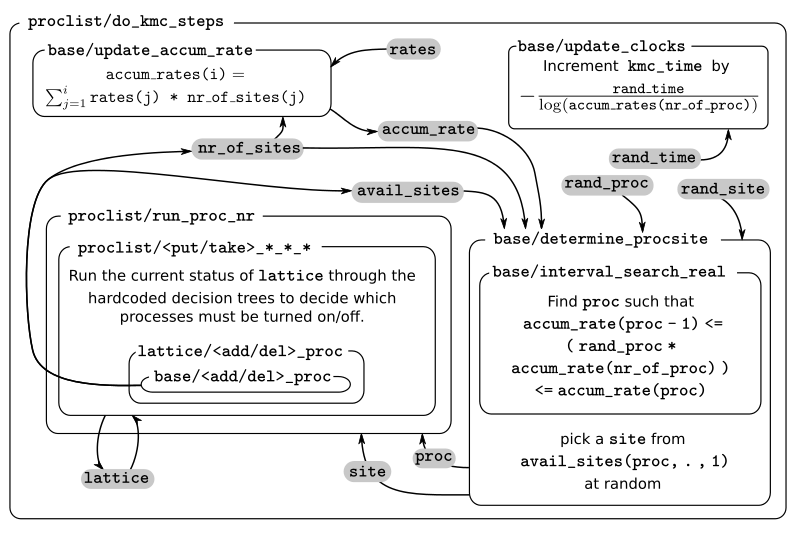
A kMC step using kmcos’ local_smart backend. Subroutines are represented by labeled boxes. The content of a given box summarizes the operations performed by the subroutine or the subroutines called by it. Variables (scalar or arrays) are indicated by gray boxes. An arrow pointing to a variable indicates that a subroutine updates it (or defines it). Arrows pointing to a subroutine indicate that the routine uses the variable. In kmcos, the passing of information occurs both through subroutine arguments and through module-wide shared variables; this distinction is not present in the diagram.
The main role of the bookkeeping arrays from last section, specially
avail_sites and nr_of_sites, is to make kMC steps execute fast
and without the need to query the full lattice state. The routines
do_kmc_step and do_kmc_steps from the proclist module
execute such steps. The diagram above represents the functions called by these
routines.
During system initialization, the current state of the system is written
into the lattice array and the avail_sites and nr_of_sites
arrays are initialized according to this. With these arrays in sync, it
is possible to evaluate accum_rates according to eq. (1). With this information, and using two random
numbers  , the
routine
, the
routine base/determine_procsite can select the next event to
execute. This subroutine first selects a process according to the
probabilities given by accum_rates. This is achieved by multiplying
the total accumulated rate, i.e. the last element of accum_rates,
times ran_proc. The subroutine base/interval_search_real
implements a binary
search to find
the index proc such that
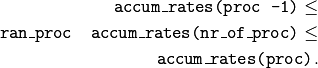
This step scales O( (
(nr_of_proc)). Then, a site is
selected with uniform probability from the (non-zero) items of
avail_sites(proc,:,1). This is valid because all individual events
associated to a given processes share the same rate constant. This way,
we avoid searching through the whole lattice, and we are able to select
a site at constant time.
After this, the proclist/run_proc_nr subroutine is called with
proc and site as arguments. This function first calls
base/increment_procstat with proc as argument to keep track of
the times each process is executed. Next, it uses the nr2lattice
look-up table to transform the scalar site variable into the 4D
representation (see lattice.f90). Finally, this
function calls the methods which actually update the the lattice state
and, consistent with this, the bookkeeping arrays. These are the
proclist/take_<species>_<layer>_<site> and
proclist/put_<species>_<layer>_<site> methods. Given a lattice site,
take methods replace the corresponding species sitting there with
the default species. The put methods do the converse. The set of put and
take routines that need to be executed by each process are directly
obtained from the conditions and actions from the process definition.
These are hard-coded into the proclist/run_proc_nr routine,
organized in a case-select block for the proc variable.
The proclist/take_<species>_<layer>_<site> and
proclist/put_<species>_<layer>_<site> subroutines are arguably the
most complex of a local_smart kmcos model. Their ultimate goal is to
call lattice/add_proc and/or lattice/del_proc to update
avail_sites and nr_of_sites in correspondence with the change in
the lattice they are effecting. To do this they need to query the
current state of the lattice. The structure of these routines is
described below.
The actual update of avail_sites and nr_of_proc is done by the
base/add_proc and base/del_proc functions. Under Updating avail_sites below, we explain how
these functions make use of the structure of avail_sites to make
updates take constant time. Once these arrays have been updated, the
bookkeeping arrays are again in sync with the lattice state. Therefore,
it is possible to reevaluate accum_rates using eq. (1) and start the process for the selection of the next step.
The put and take routines
These subroutines take care of updating the lattice and keeping the
bookkeeping arrays in sync with it. When the occupation of a given site
changes, some formerly active events need to be deactivated, while some
formerly inactive events need to be activated. Figuring out which those
events are is the main role of the put and take routines.
In kmcos, processes are represented by a list of conditions and a list of actions. An event is active if and only if all the conditions of its associated process are satisfied. As the put and take routines only look at the change of an individual site in the lattice, determining which events need to be turned-off is straightforward: All active events which have a condition that gets unfulfilled on the site affected by the put/take routine will be deactivated. This is the first thing put/take routines do after updating the lattice.
Deciding which processes need to be activated is more involved. All inactive events with a condition that gets fulfilled by the effect of the put/take routine are candidates for activation. However, in this case, it is necessary to check the lattice state to find out whether or not such events have all other conditions fulfilled. A straightforward of accomplishing this is to sequentially look at each event, i.e.:
FOR each candidate event E
    TurnOn = True
    FOR each condition C of E
    IF C is unfulfilled:
        TurnOn = False
        break
    ENDIF
    ENDFOR
    IF TurnOn is True:
    Activate E
    ENDIF
ENDFOR
However, chances are that many of the candidate events will have conditions on the same site. Therefore, a routine like the above would query a given lattice site many times for each execution of a put/take routine. For complex models with many conditions in the processes, this could become quickly the main computational bottleneck of the simulation.
The alternative to this naive approach, is to try to build a decision
tree that queries the lattice state more efficiently. kmcos generates
such a decision tree using an heuristic algorithm. The main idea behind
it is to group all the sites that would need to be queried and to sort
them by the number of candidate events with conditions on them. A
decision tree is built such that sites are queried on that order, thus
prioritizing the sites that are more likely to reduce the number of
processes that need activation. Such decision trees are implemented as
select-case trees in the put/take routines and typically occupy the bulk
of the code of proclist.f90. A more detailed description on how this
is done is discussed below.
Updating avail_sites

Adding an process to the =avail_sites= array. Pseudocode for the addition of a process is also indicated.
The avail_sites and nr_of_sites arrays are only updated through
the base/add_proc and base/del_proc subroutines, which take a
process index proc and a site index site as input arguments.
Adding events is programmatically easier. As the rows of
avail_sites( :, :, 1) are filled from the left, the new event can be
added by changing the first zero item of the corresponding row, i.e.
avail_sites(proc, nr_of_sites(proc) + 1, 1), to site and
updating avail_sites( :, :, 2) and nr_of_procs accordingly. An
example of this procedure is presented in the figure above.

Deleting an process from =avail_sites= array. Pseudocode for the deletion of a process is also indicated.
Deleting an event is slightly more involved, as non-zero elements in
avail_sites(:, :, 1) rows need to remain contiguous and on the left
side of the array. To ensure this, the element that would be deleted
(somewhere in the middle of the array) is updated to the value of the
last non-zero element of the row, which is later deleted. To keep the
arrays in sync, avail_sites(. , . , 2) is also updated, by updating
the index of the moved site to reflect its new position. Finally,
avail_sites(site, proc, 2) is set to zero. The figure
above shows an example and presents pseudocode for such an update.
Having the information in avail_sites(:,:,1) duplicated (but
restructures) in avail_sites(:,:,2) allows these update operations
to be performed in constant time, instead of needing to perform updates
that scale with the system size.
A kmc step with the lat_int backend
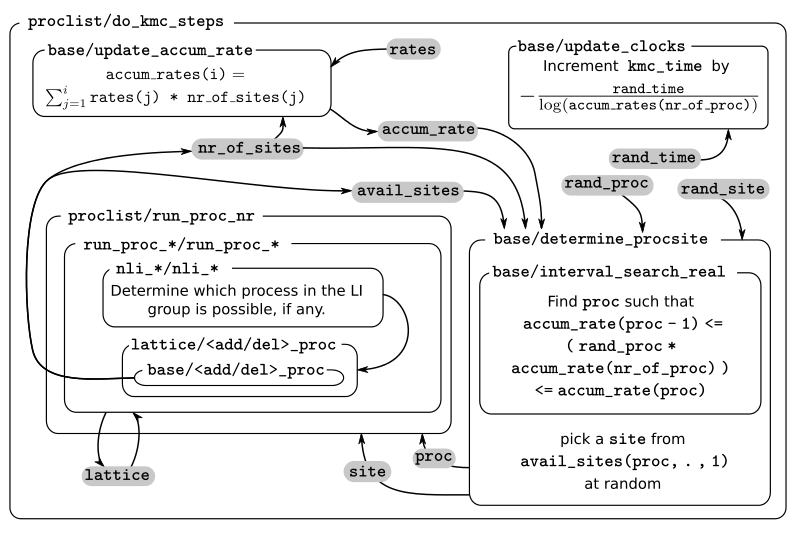
A kMC step using kmcos’ lat_int backend. Subroutines are represented by labeled boxes. The content of a given box summarizes the operations performed by the subroutine or the subroutines called by it. Variables (scalar or arrays) are indicated by gray boxes. An arrow pointing to a variable indicates that a subroutine updates it (or defines it). Arrows pointing to a subroutine indicate that the routine uses the variable. In kmcos, the passing of information occurs both through subroutine arguments and through module-wide shared variables; this distinction is not present in the diagram.
The process of executing a kMC step with the lat_int backend is very
similar as that of the local_smart backend. In particular, the way
avail_sites, nr_of_procs and accum_rates are updated, as
well as the selection of process and site indices proc and site
that will be executed is identical. The only difference exists withing
the call of the proclist/run_proc_nr routine, as the routines for
finding which events need to be (de)activated are implemented
differently.
In lat_int, proclist/proc_run_nr does not call put and
take subroutines (which do not exist in the lat_int code-base),
but calls subroutines specific to each lateral interaction group
run_proc_<lat_int_nr>/run_proc_<lat_int_group>. They do not directly
implement a decision tree, but rely on the
nli_<lat_int_nr>/nli_<lat_int_group> functions.
The nli_<lat_int_nr>/nli_<lat_int_group> perform the analysis of the
lattice state. They take a site on the lattice and look at the
conditions of the elements of the corresponding lateral interaction
event group. Using this information, they return the index of the
process (within the lateral interaction group) which can currently be
executed. If none can, it returns 0.
A proclist/run_proc_<lat_int_group> routine first calls del_proc
for each lateral interaction event group which has a condition
(including bystanders) affected by the changes in the lattice. The
argument for del_proc will be the output of the corresponding
nli_* functions, which will figure out which of the events is
currently active (and can thus be deleted). After deleting processes,
the lattice is updated according to the actions of the lateral
interaction group. Once the new system state is set, add_proc is
called for the same processes that del_proc was called, again using
nli_* as argument. This way, the correct processes associated to the
new state of the lattice will be activated.
This method works because of a slight, but important, difference in
base/add_proc and base/del_proc between lat_int and
local_smart. In local_smart, calling one of these functions with
an argument proc=0 would lead to a program failure. In lat_int,
this leads to the functions simply not adding or deleting any process to
avail_sites.
A kmc step with the otf backend
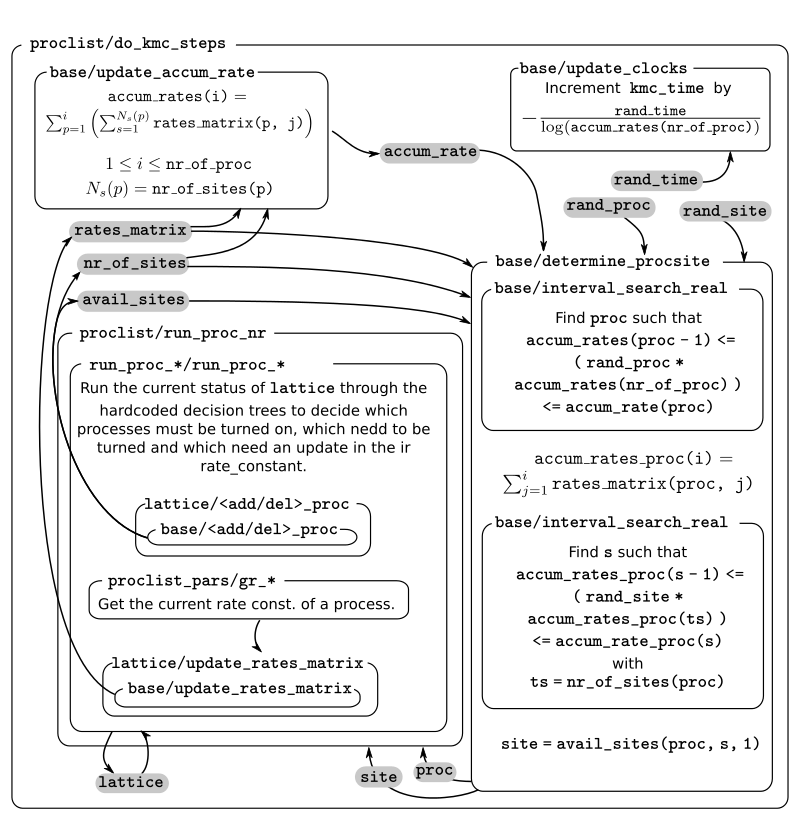
A kMC step in with the otf backend. Subroutines are represented by labeled boxed, located inside the box corresponding to the calling function. Variables (scalar or arrays) are indicated by gray boxes. An arrow pointing to a variable indicates that a subroutine updates it (or defines it). An arrows pointing to a subroutine indicates that the routine uses the variable or the output of the function. The passing of information occurs both through subroutine arguments and through module-wide shared variables; this distinction is not present in the diagram.
As expected, the algorithm for running a kMC step with otf differs
considerably from local_smart and lat_int. Firstly, the update
of the accum_rates is more involved, as different copies of the
processes do not share a single rate constant. For this reason, it is
necessary to use the rates_matrix array, which contains the current
rate constants for all active events. The accum_rates array is
updated according to
The computational time to perform this summation now scales as
 ,
instead of the
,
instead of the  for
for
local_smart. Though this might seem like a disadvantage, it is
important to notice that the value of nr_of_procs in otf can be
smaller (potentially by several orders of magnitude) than in
local_smart, and thus otf can outperform local_small for
complex models (many lateral interactions) when using sufficiently small
simulation sizes (small volume).
Once accum_rates is evaluated, base/determine_procsite proceeds
to find the process index proc of the event to be executed. This is
achieved by performing a binary search on accum_rates, exactly like
in local_smart or lat_int. To select the site index, it is
first necessary to evaluate

i.e. the partial sums of rates for the different events associated to
process proc. Then a second binary search can be performed on
accum_rates_proc to find s such that

Therefore, s corresponds to the index of the selected site according to
the current order of the avail_sites(:, :, 1) array. The site index
as site = avail_sites(proc, s, 1).
The process of updating the lattice and the bookkeeping arrays is also
rather different. As in the other backends, first
proclist/run_proc_nr is called with proc and site as
arguments. Besides calling base/increment_procstat, it is
responsible for calling the adequate
run_proc_<proc_nr>/run_proc_<proc_name> routine. There is one of
such routine for each process and they play the same role as the put
and take routines in local_smart. The main difference is that
these routines are built for executing full processes instead of
elemental changes to individual sites. These functions need to look into
the state of lattice and determine:
- which events get one or more of their conditions unfulfilled by the executed event
- which events get one or more of their condition fulfilled by the executed event and also have all other conditions fulfilled
- which events are affected by a change in one of their bystanders
For events in (a), run_proc_<proc_nr>/run_proc_<proc_name> run
lattice/del_proc. For events in (b) and (c), rate constants are
needed. This is done using functions from proclist_pars module, as
described below. With the know rate constants,
run_proc_<proc_nr>/run_proc_<proc_name> calls lattice/add_proc
for each event in (b) and lattice/update_rates_matrix for each event
in (c). In otf, lattice/add_proc and base/add_proc take a
floating point argument for the rate constant in addition to the usual
site and proc arguments. More details on the structure of these
routines will be given in the section on the translation algorithm.
Rate constants are evaluated using the
proclist_params/gr_<proc_name>. These functions look at the current
state of the lattice to evaluate a integer array nr_vars which
encodes the number of the different types of interactions that are
present. This is used as input for the corresponding
proclist_pars/rate_<proc_name> which implements the user defined
rate expression. These can include user-defined parameters, which are
encoded in FORTRAN with the userpar array in the proclist_pars
module.
After proclist/run_proc_nr executes, the lattice,
avail_sites, nr_of_sites and rates_matrix are in sync again,
and the next kMC step can start with the evaluation of accum_rates.
The code generation routines
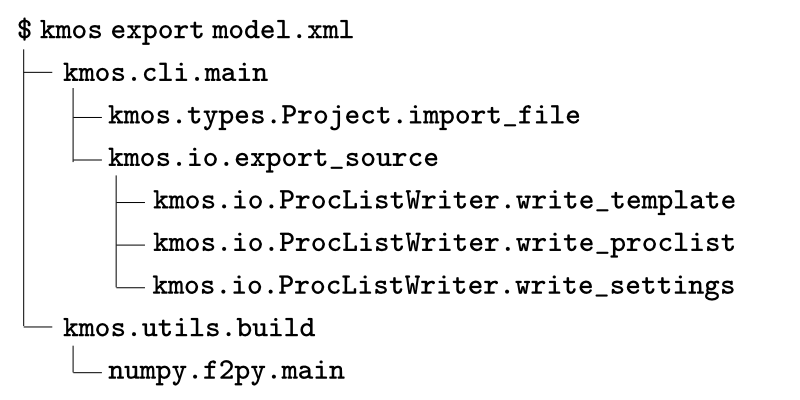
Routines called during the export of a kmcos model
As most of the source code described in the previous sections is
generated automatically, it is crucial to also understand how this
works. Code generation are contained in the kmcos.io Python
submodule. The normal way to use this module is through the command
line, i.e. invoking the kmcos export command. The figure above shows the subroutines/functions which are called
when this is done. The command line call itself is handled by the
kmcos.cli submodule. Furthermore, the export procedure relies on the
classes from the kmcos.types submodule, which define the abstract
representation of the kMC model. Specifically, a model definition from
an xml or ini file into a kmcos.types.Project object. The
rest is done with the help of an instance of the
kmcos.io.ProcListWriter class, which contains several methods that
write source code. Specifically, Fortran source code is generated in one
of three ways:
- files are copied directly from kmcos’ installation
- code is generated with the help of a template file, which is
processed by the
kmcos.io.ProcListWriter.write_templatemethod - code is written from scratch by one of the several
kmcos.io.ProcListWriter.write_proclist_*methods.
The format of the template files and how
kmcos.io.ProcListWriter.write_template works is explained in next
section. The kmcos.io.ProcListWriter.write_proclist method calls
several other methods in charge of building different parts of the
source code, these methods are named according to the pattern
kmcos.io.ProcListWriter.write_proclist_*. Exactly which of these
methods are called depends on the backend being used. Some of such
functions are specific to a certain backend, while other work for more
than one backend. This is detailed under The write_proclist method.
The source file template
Template files are located in the kmcos/fortran_src/ folder of the
kmcos’ source code and have the mpy extension. Each line of these
files contains either
- Python source code or
- template text prefixed with
#@
kmcos.utils.evaluate_template processes these files to convert them
into valid python code. The Python lines are left unchanged, while the
template lines are replaced by code adding the content of the line (i.e.
things after the #@) to a string variable result. Template lines
can contain placeholders, included as a variable name enclosed in curly
brackets ( { and } ). If those variable names are found within
the local variables of the corresponding
kmcos.utils.evaluate_templates call, the placeholders are replaced by
the variable values. The kmcos.utils.evaluate_template method accepts
arbitrary keyword
arguments.
In addition, the kmcos.io.ProcListWriter.write_template is passed the
current instance of the ProcListWriter class as self, the loaded
kMC model information (i.e. the kmcos.types.Project) instance as
data and an options dictionary with additional settings as
options.
With such template files it is possible to include some programmatically
dependence on the model characteristics and other settings to an
otherwise mostly static file. For example, in the
proclist_constants.mpy template, the following text
for i, process in enumerate(self.data.process_list):
    ip1 = i + 1
    #@ integer(kind=iint), parameter, public :: {process.name} = {ip1}
is used to hard-coded the name constants used throughout the code to reference a process’ index.
The write_proclist method
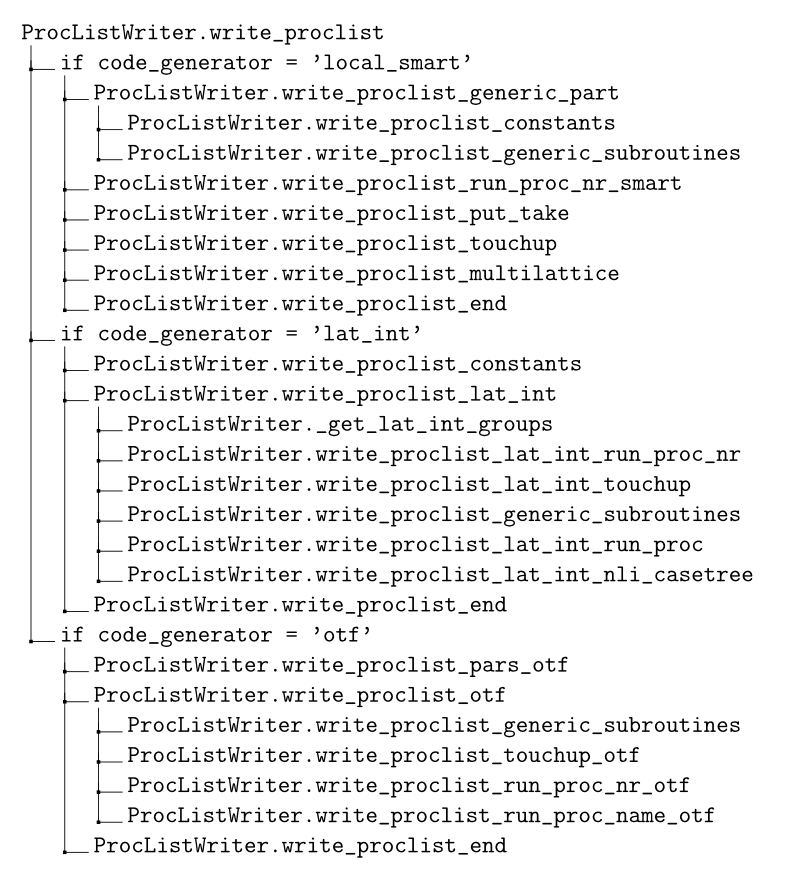
Routines used to write proclist and associated modules for the different backends.
The scheme above shows the methods called by
kmcos.io.ProcListWriter.write_proclist to write proclist.f90 and,
for lat_int and otf, related files (proclist_constants.f90,
proclist_pars.f90, run_proc_*.f90, nli_*.f90). All these
kmcos.io.Proclist.write_proclist_* methods take an out argument
which is a file
object
to which the code is to be written and most take a data argument
which is an instance of kmcos.types.Project containing the abstract
kMC model definition. Many of them also take a code_generator
keyword argument with the backend’s name. In what follows we briefly
describe each of the individual methods. For clarity, they have been
categorized according to the backend by which they are used. In cases in
which the same routine is called to more than one backend, the
description is presented only once.
Methods called to build local_smart source code
write_proclist_generic_part
This routine is only used by the local_smart backend. “Generic part”
refers to the auxiliary constants defined in proclist (which exist
in a separate file in lat_int and otf) and the functions whose
code does not depend on the process details (e.g.
proclist/do_kmc_steps).
write_proclist_constants
Uses the proclist_constants.mpy template to generate code defining
named constants for the indices of each process and each species on the
model. In local_smart this is added at the top of the
proclist.f90 file; in lat_int and otf this is included
separately as the proclist_constants.f90 file.
write_proclist_generic_subroutines
Uses the proclist_generic_subroutines.mpy template to write several
routines not directly related with the tree search of process update,
namely: do_kmc_steps, do_kmc_step, get_next_kmc_step,
get_occupation, init, initialize_state and (only for
otf) recalculate_rates_matrix.
write_proclist_run_proc_nr_smart
Writes the proclist/run_proc_nr function, which calls put and
take routines according to the process selected by
base/determine_procsite. This is basically a nested for-loop, first
over the processes and then over the actions of such process. The only
tricky part is to input correctly the relative coordinate for which the
take and put routines need to be called. This is done with the
help of the kmcos.types.Coord.radd_ff method.
write_proclist_put_take
This is the most complex part of the local_smart code generator, in
charge of writing a put and a take routine for each combination
of site type and species in the model (except for the default species).
These routines need to decide which events to activate or deactivate
given an specific change in the lattice state.
The write_proclist_put_take is organized as several nested for
loops. The outermost goes through each species in the model, the
following through each layer and site type, and the next through the two
possibilities, put and take. At this point, a specific
put_<species>_<layer>_<site> or take_<species>_<layer>_<site>
subroutine is being written.
For each of these routines, it is necessary to check which events (located relative to the affected site) can potentially be activated or deactivated by the operation being executed. This is done with further nested loops, going through each process and then through each condition of such process.
If a fulfilling match is found (i.e. the species and site type of the
condition matches the site and species of a put routine or there is
a condition associated to the default species on the site affected by a
take routine) a marker to the corresponding process is stored in
the enabled_procs list. This marker is a nested tuple with the
following structure:
- first a list of
kmcos.types.ConditionActionobjects (see below) - then a tuple containing
- the name of the process
- the relative executing coordinate of the process with respect to the matching condition
- a constant True value.
The list of ConditionAction objects contain an entry for each of the
conditions of the given process, except for the condition that
matched. The species are the same, but the coordinates of the these new
ConditionAction objects are relative to the the coordinate of the
matching condition. This way, we gain access to the position of the
conditions of the events that can potentially be activated by the
put or take routine relative to the position that is being
affected in the surface. Note that potentially more than one marker
could be added to the list for a given process. This would correspond to
the possibility of different events associated to the same process being
activated.
If an unfulfilling match is found, a tuple is added to the
disabled_procs list. This tuple contains
- the process object and
- the relative position of the process with respect to the matching condition
There is less information in this case because the logic for disabling processes is much simpler than that for enabling them.
Once these enabled_procs and disabled_procs lists have been
collected, a del_proc statement for each event in disabled_procs
is written. Finally, the routine needs to write the decision tree to
figure out which events to activate. This is done by the
kmcos.io.ProcListWriter._write_optimal_iftree method, which calls
itself recursively to build an optimized select-case tree.
_write_optimal_iftree expects an object with the same structure as
the enabled_procs list as input. This is called items in the
method’s body. At the start, each entry of the list corresponds to an
event that potentially needs to be activated. Associated to each of
those, there is a list of all conditions missing for this events to be
activated. If in the initial call to _write_optimal_iftree one of
the events has no missing conditions (i.e. the corresponding list is
empty), this means that their only condition was whatever the put or
take routine provided. Consequently, the first step this method
takes is to write a call to add_proc for those events (if any). Such
events are then be removed from the items list.
Next the procedure that heuristically optimizes the if-tree starts. From
items, it is possible to obtain the most frequent coordinate, i.e.
that which appears most often within the lists of missing conditions.
Such coordinate is selected to be queried first in the select-case
tree. The possible cases correspond to the different possible species
adsorbed at this coordinate. The routine iterates through those. For
each species, it writes first the case statement. Then, the
processes in items whose condition in the most frequent coordinate
matches the current species are added to a reduced items list called
nested_items. Next, the condition in the most frequent coordinate
will be removed from the nested_items, creating the pruned_items
list. This reduced list is used as input for a successive call to
_write_optimal_iftree. The events that where included in
nested_items are then removed from the items list.
It is possible (likely) that not all events will be have conditions in
the most frequent coordinate. If this is the case,
_write_optimal_iftree need to be called again to start an additional
top-level case-tree to explore those processes.
In this way, further calls are made to _write_optimal_iftree, each
of which in which the items list is shorter, of the item themselves
contain fewer conditions. These calls “branch out”, but each branch
eventually leads to calls with empty items list, which closes the
corresponding branch. The decision tree finishes writing when all
elements of enabled_procs have been exhausted.
write_proclist_touchup
This routine is in charge of writing the
proclist/touchup_<layer>_<site>, one for each site type. These
routines update the state of the lattice, one site at a time.
They first delete all possible events with executing coordinate in the
current site. Then, they collect a list of all processes with executing
coordinate matching the current site type. The list is built with the
same structure as the enabled_procs list described in section (see
here). This is then fed to the
_write_optimal_subtree method, to build a decision tree that can
decide which of those process are to be turned-on given the current
state of the lattice.
TODO write_proclist_multilattice
write_proclist_end
This simply closes the proclist module with end module proclist.
Methods called to build lat_int source code
write_proclist_lat_int
This writes the header of the proclist.f90 file for lat_int and
then calls several write_proclist_lat_int_* functions in charge of
writing the different routines of the module. Before it can do this, it
needs to call _get_lat_int_groups, a method that finds all lateral
interaction groups and returns them as a dictionary. This dictionary has
the names of the groups as keys and the corresponding lists of processes
as values. The name of a group is the name of the process within it with
the lowest index (this coincides with the first process in the group
when sorted alphabetically).
write_proclist_lat_int_run_proc_nr
This functions is similar to its local_smart counterpart (see
here). The only difference
is that this routine needs to decide between lateral interaction groups
instead of individual processes, as selecting the individual process
within the group is done by the nli_* subroutines. For this reason,
the indices of all processes of a group are included inside the
case( ... ) statements.
write_proclist_lat_int_touchup
Writing the touchup functions is much simpler here than in
local_smart, as here we can rely on the nli_* functions (see
here). As in local_smart, all processes are deleted
(just in case they were activated). Then add_proc is called for each
lateral interaction group, using the result of the corresponding
nli_<lat_int_group> function as input. Thus, an event will be added
only if that function returns non-zero.
write_proclist_lat_int_run_proc
This method writes a run_proc_<lat_int_nr> module for each lateral
interaction group. Each of these modules is located in its own file. The
first step for writing the modules consists of finding all lateral
interaction event groups which are affected by the actions of the
current lateral interaction group. These are included in the list
modified_procs. Once the list is built, a del_proc call is
written for each of them, using the results of the corresponding
nli_<lat_int_group> as argument. Then, it writes calls to
replace_species to update the lattice. Finally a call to
add_proc is added for each element of modified_procs, using the
corresponding nli_<lat_int_group> as argument.
write_proclist_lat_int_nli_casetree
This method writes the nli_* routines, which decide which, if any,
of the processes in a lateral interaction group can be executed in a
given site of the lattice. For this, the method builds a nested
dictionary, case_tree, which encodes the decision tree. This is then
translated into a select-case Fortran block by the
kmcos.io._casetree_dict function.
Methods called to build otf source code
write_proclist_pars_otf
This method is only used by the otf backend. It is in charge of
writing the proclist_pars.f90 file. This module has two main roles:
the first is to provide access to the user-defined parameters and other
physical parameters and constants at the Fortran level. The second, to
provide the routines which evaluate the rate constants during execution.
The routine first writes the declaration of the userpar array, used
to store the value of the user-defined parameters. In addition,
auxiliary integer constants (named as the parameters in the model) are
declared to help with the indexing of this array. The
_otf_get_auxiliary_params method is used to collect lists of
constants, including the definitions of physical units, atomic masses
and chemical potentials used in the rate expressions in the model. The
constants and atomic masses are declared as constants with their
corresponding value (evaluated using kmcos.evaluate_rate_expression).
If needed, a chempot array is included, which is used to store the
value of the chemical potentials used in the model (auxiliary indexing
variables are also included for this array).
In addition, this method writes a routine to update userpar from the
Python interface, and another to read the values of such array. If
needed, a routine to update chempots is also added.
In addition, this routine writes the functions used to evaluate the rate
constants during execution. For each process, a gr_<process_name>
and a rate_<process_name> are written. gr_<process_name> loops
through all the bystanders to count how many neighbors of a given
species there is for each “flag” associated to the process (see as
determined by its
bystanders).
These counts are accumulated in the nr_vars array. This array is
used as input to the corresponding rate_<process_name> routine. The
content of this routine is directly obtained from the otf_rate
attribute of the the kmcos.types.Process object. This user-defined
string is processed by the _parse_otf_rate method to replace the
standard parameter and constant names with the names understood by this
Fortran module.
write_proclist_touchup_otf
This method writes the subroutines used to initialize the state of the
bookkeeping arrays at the start of a simulation. For this, it calls the
_write_optimal_iftree_otf with all possible events associated to the
current site (i.e. with all processes). The routine
_write_optimal_iftree_otf is very similar to the
_write_optimal_iftree routine described used by local_smart’s write_proclist_run_proc_nr_smart (see here).
The most remarkable difference is that in otf the add_proc routine
needs to be called with the result of a gr_<proc_name> routine as an
argument (to evaluate the current value of the event’s rate constant).
write_proclist_run_proc_nr_otf
The subroutine written by this method is very similar to its counterpart
in the lat_int backend, only needing to decide which specific
run_proc_<procname> function to call.
write_proclist_run_proc_name_otf
The run_proc_<proc_name> routines are the ones in charge of updating
the bookkeeping arrays once a given event has been selected for
execution. They are similar to their counterpart in lat_int in that
there is one for each lateral interaction group. In otf there is
only one process per “lateral interaction group”, so there is one such
routine per process. They are also similar to the put_* and
take_* subroutines from local_smart because they use very
similar logic to build the hardcoded decision trees. The main difference
between these backends is that the run_proc_<proc_name> routines of
otf implement decision trees that take into account the changes in
all sites affected by a process, while in local_smart put_* and
take_* routines consider only an elementary change to a single site.
The first thing that write_proclist_run_proc_name_otf does is to
collect a list with all the events for which one of the actions of the
executing process unfulfills a condition (inh_procs), a list with
all the processes for which they fulfill a condition (enh_procs) and
a list with all the processes for which they modify the state of one of
the bystanders (aff_procs). The processes that are included in
inh_procs list are excluded from the other two lists.
Once this is done, calls to del_proc are written for all processes
in inh_procs. Then, calls to the replace_species subroutine are
added, so as to update the lattice according to the actions of the
executing process. Afterwards, the subroutine update_rates_matrix is
called for each process in aff_procs to update the corresponding
rate constant.
As in the case of local_smart the most complex operation is that of
activating processes, as the state of the lattice needs to be queried
efficiently. To do this, a new list, enabling_items, is built based
on the enh_procs list. enabling_items contains an entry for each
process in enh_process. These entries are tuples containing:
- a list of conditions which are not satisfied by the executing event
- a tuple containing:
- the name of the process
- the relative position of the process with respect to the coordinate of the executing process
- a constant
Truevalue.
This list is analogous to the enabled_procs list used by the
write_proclist_put_take routine of the local_smart backend (see
here). This list is used as input for
the _write_optimal_iftree_otf method. This is very similar to the
_write_optimal_iftree, with the only difference that calls to
add_proc also need to include the result of the gr_<proc_name>
functions as arguments.